Pay on delivery and deposits
Decide what Vendwa may offer at checkout. Payment before dispatch is the default.
By default Vendwa asks for payment before anything is dispatched. You can loosen that.
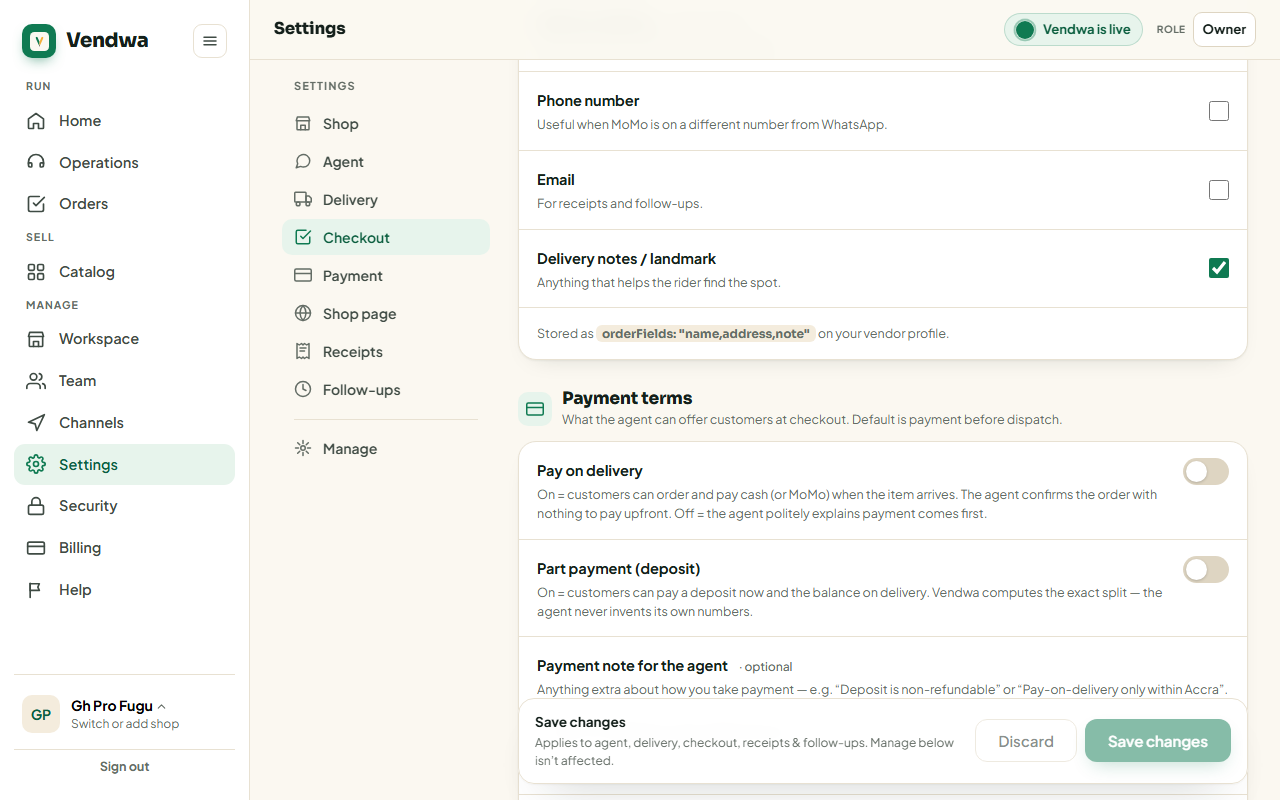
These settings decide when a customer pays, not how. How they pay depends on your shop: they send money to your MoMo number and you mark the order paid, or, if we have switched MoMo payment prompts on for you, Vendwa sends the request to their phone. Both follow the rules on this page.
Turn on payment on delivery
- Open Settings, then Payment terms. In the app: Account, Shop details, Payment.
- Turn on Payment on delivery.
- Choose where it is offered: all your delivery zones, or only the ones you pick.
- Save.
Payment on delivery is offered per zone, so add your delivery zones first. Paying by MoMo before delivery stays available.
Turn on part payment
- In Payment terms, turn on Part payment (deposit).
- Set the % due upfront, from 10 to 90. Most shops use 50.
- Save.
Customers can now pay a deposit and the balance on delivery. Vendwa works out the exact split. It never invents its own numbers.
Write your own rules
The Payment note box sets what Vendwa may say about payment. "Deposit is non-refundable." "Pay-on-delivery only within Accra." Vendwa quotes your note as it stands. It will not extend it, soften it, or guess at a rule you did not write.
Returns have their own section: Settings, Returns & exchanges. See Returns and exchanges.
Good to know
- With payment on delivery or deposits, part of the money arrives after dispatch. Vendwa writes the terms on every order, but collecting the balance is on you and your rider.
- Only an owner or a manager can change these settings.
We read every answer. We do not ask for your name.