Product cards in chat
Web & iOS 1 min read
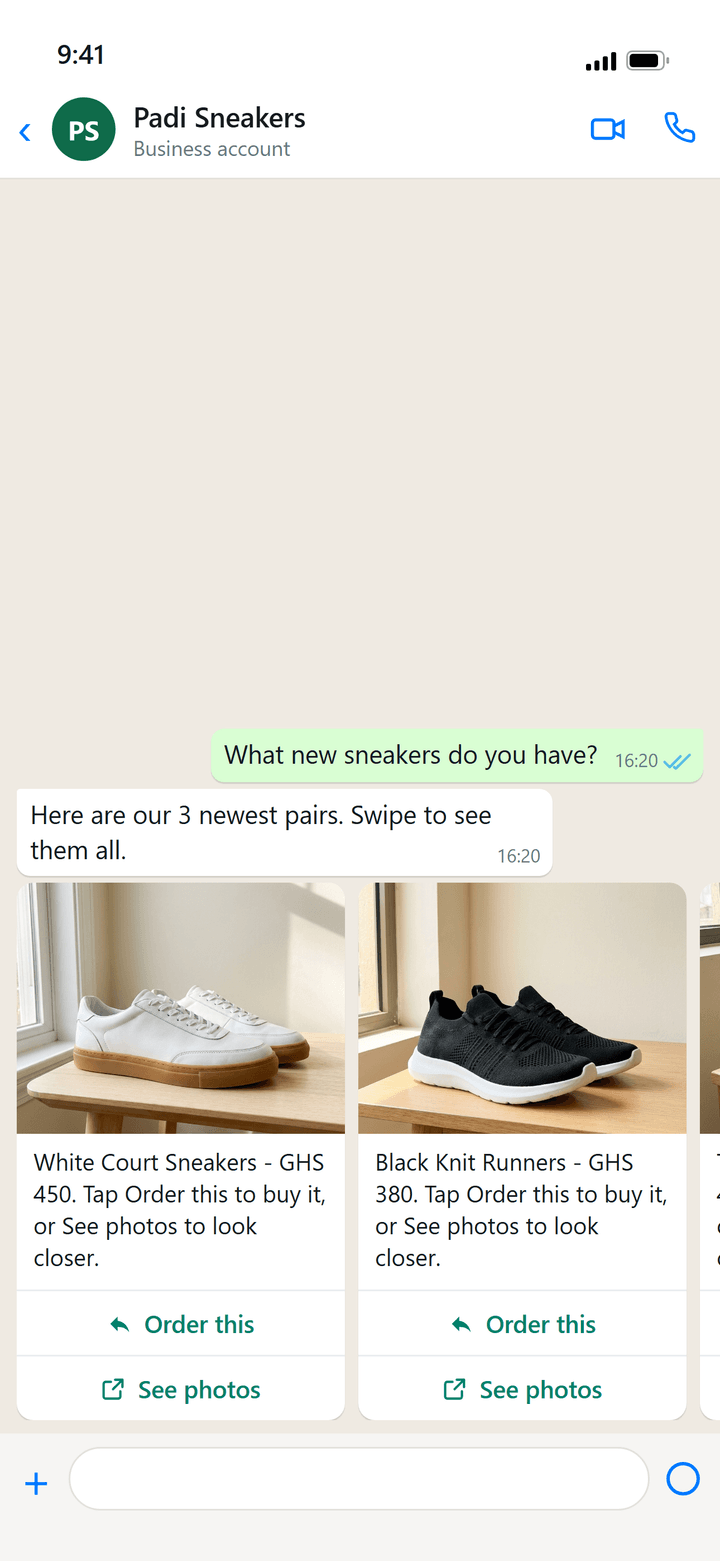
When a customer asks what you have, Vendwa can send swipeable product cards with a photo, the price, Order this and See photos.
"What do you have in black?" A list of names in a text message is hard to shop from. So on WhatsApp, Vendwa can answer with product cards the customer swipes through.
What a card shows
- The product's cover photo.
- Its name and price, taken from your catalog at that moment.
- Order this, which starts the order for that item in the same chat.
- See photos, which opens the item on your shop page.
The customer swipes left and right through the cards, in the order Vendwa picked them for the question.
When Vendwa sends them
When a customer is browsing: asking what you have, what is new, or what comes in a colour or size. When the customer already named one item, Vendwa just answers about that item.
Only products that are in stock and have a photo can become cards.
What you do
Nothing extra. Good cards come from a good catalog:
- a clear cover photo. See Cleaner product photos;
- a name your customers would use;
- the right price and stock.
Good to know
- Cards are a WhatsApp feature. On Instagram, Vendwa answers in words and sends photos.
- Tapping Order this is not a commitment. Vendwa still confirms size, quantity, delivery and payment before anything is recorded.
Was this helpful?
We read every answer. We do not ask for your name.