Cleaner product photos
Web & iOS 1 min read
Vendwa makes a tidy white-background version of your cover photo. Sometimes it asks you first. Your own photos always stay.
A dress photographed on a bed, a shoe on a busy counter. Your customer still has to picture it in their hands. So Vendwa makes a clean version of each product's cover photo: the item alone, on a white square.
What happens
When you add or change a cover photo, Vendwa makes the clean version in the background. Then one of two things happens:
- It looks right. It becomes the product's main picture on your shop page and in chats. Nothing for you to do.
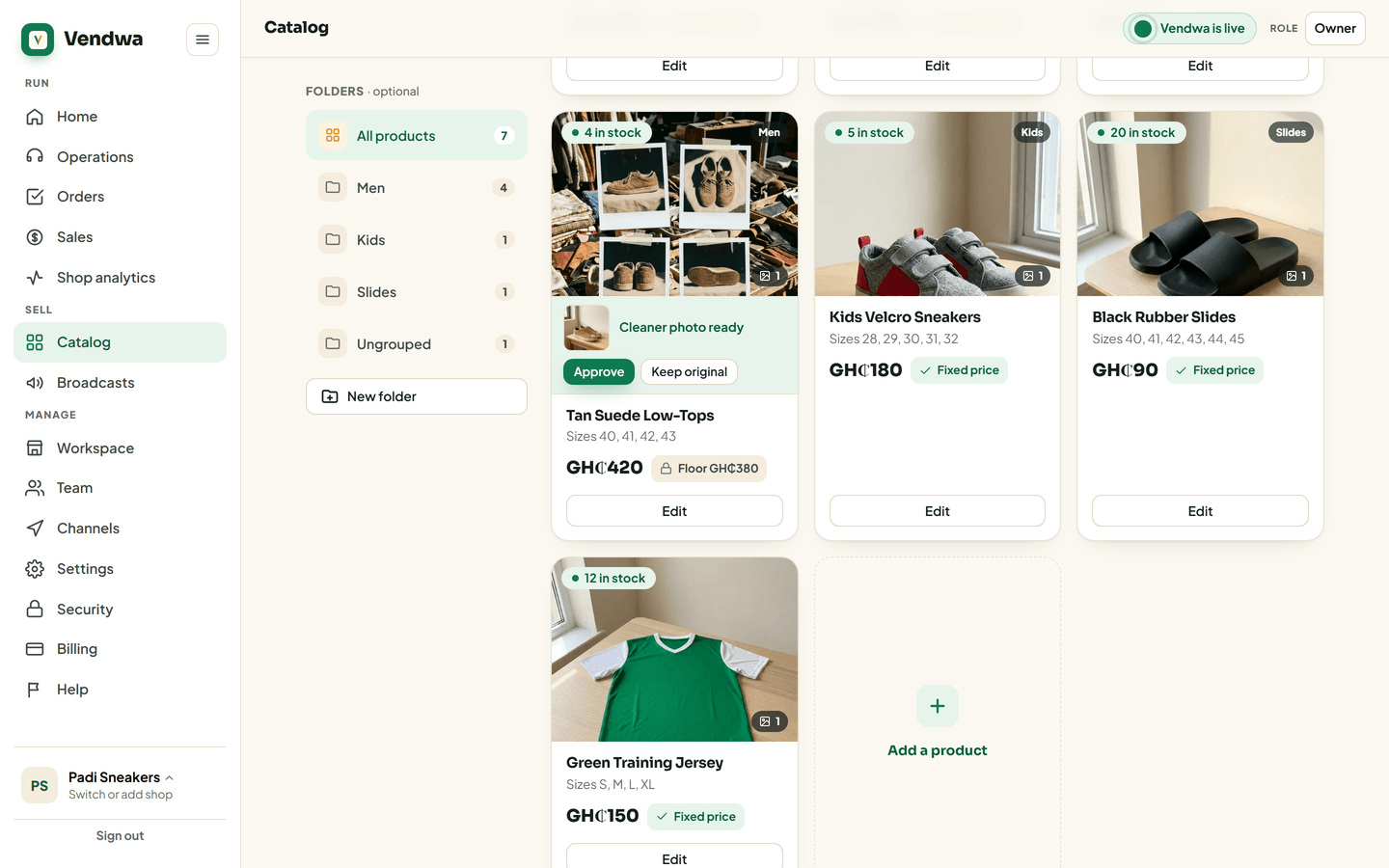
- It needs your eye. The product in your catalog shows a strip: Cleaner photo ready. You also get a push.
Approve or keep your own
- Open Catalog.
- Find the product with the Cleaner photo ready strip.
- Tap Approve to use the clean version, or Keep original to keep your own.
Either way, the strip goes away. Nobody but you sees a clean photo that is waiting.
Good to know
- Your own photos are never deleted. They stay in the product's gallery, after the clean one.
- Nothing on your shop page says how a photo was made.
- The clean version only works from what is in your photo. A blurry or dark cover gives a blurry or dark result, so take the cover in good light.
Was this helpful?
We read every answer. We do not ask for your name.