Test your agent with Check my shop
Web & iOS 1 min read
Vendwa asks your shop 5 common customer questions and shows you what it would say. Nothing is sent to anyone.
Before a real customer asks "do you have it in size 42?", find out what Vendwa would say. Check my shop asks your own agent 5 common questions, the way a customer would, and shows you every answer.
Run a check
- On the web, open Settings and tap Check my shop. In the app, open Account, then Check my shop.
- Tap Check now.
- Wait a few seconds while Vendwa asks your shop 5 questions.
Read the results
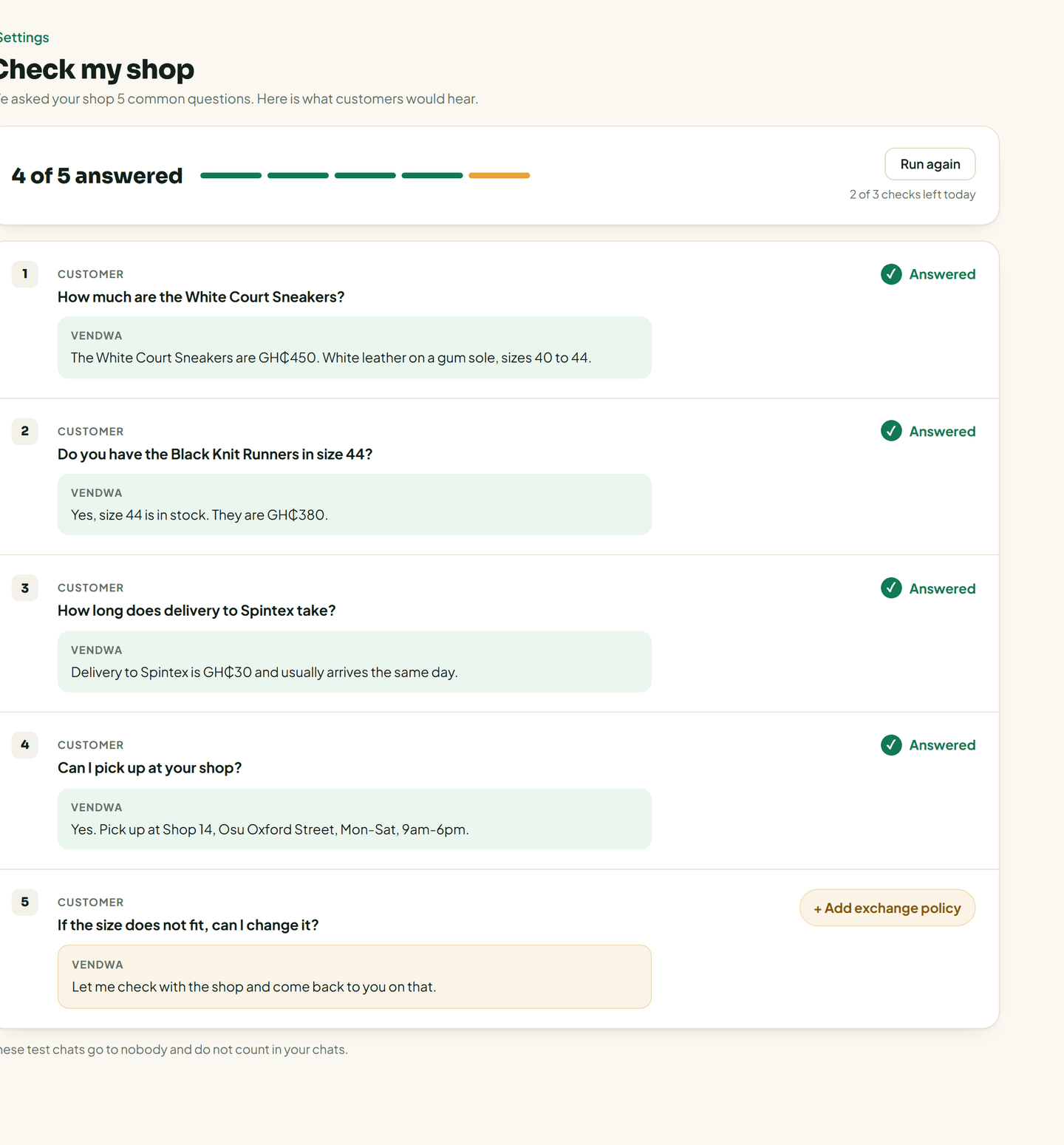
Each row shows the question, then Vendwa's reply.
- A green tick means Vendwa answered it.
- An amber row means your shop is missing something. The row has a link to fix it, such as Add sizes, Add delivery time, Add exchange policy, Add what's included or Check the price.
Tap the link, fill in the missing detail, and save. The row then reads "Fixed. Run again to confirm." Tap Run again to see the new answer.
Good to know
- These test chats go to nobody. They do not count in your conversations.
- You can run 3 checks a day.
- Only an owner or a manager can run a check. A salesperson can read the last results.
- Add at least one product first. With an empty catalog there is nothing to check.
Was this helpful?
We read every answer. We do not ask for your name.