Product photos
Web & app 1 min read
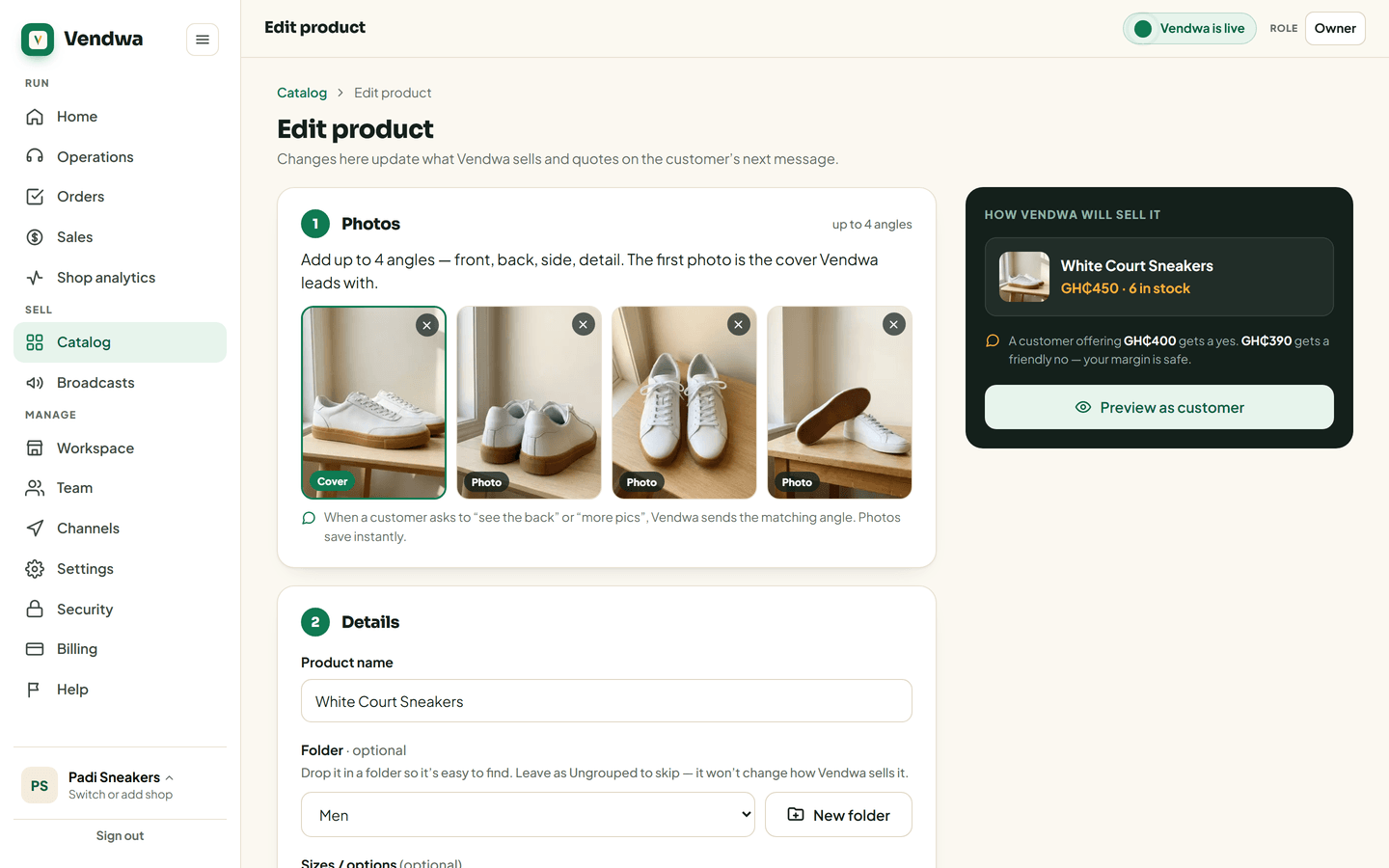
Up to four photos per item. The first is the cover. Vendwa sends the matching angle when a customer asks.
When a customer says "show me" or "see the back", Vendwa sends the photo that matches. That only works if the photo is there.
Steps
- Open the product in Catalog.
- Tap Take photo to shoot it now, or Gallery to pick one you already have. On the web, tap Add photo.
- Add up to four photos — front, back, side, detail.
- Drag or reorder so the best one is first. The first photo is the cover.
Photos save straight away on the web. On the phone they upload one by one after you save the product.
What Vendwa does with them
- A customer asks to see the item — it sends every angle you have, cover first.
- A customer asks for one angle — "the back", "a close-up" — it sends that one.
- The angle is missing — it sends the cover and says so honestly. It never pretends.
- No photo at all — it answers in words with the price and sizes.
Vendwa only sends photos when a customer asks. "Do you have it in brown?" gets an answer in words, not a flood of pictures.
Good to know
Big phone photos are shrunk before they go out, so a customer on a small data bundle still receives them.
Was this helpful?
We read every answer. We do not ask for your name.