Your monthly broadcast messages and top-ups
Web 1 min read
Starter includes 20 broadcast messages a month, Pro 40, Business 80. Need more? Buy a bundle on the web. Bundles never expire.
One message is one customer reached by one broadcast. Your plan includes some every month.
What your plan includes
| Messages a month | |
|---|---|
| Free trial | 20 |
| Starter | 20 |
| Pro | 40 |
| Business | 80 |
They start again on the 1st of each month. Unused ones do not carry over.
Broadcasts shows how many you have left this month.
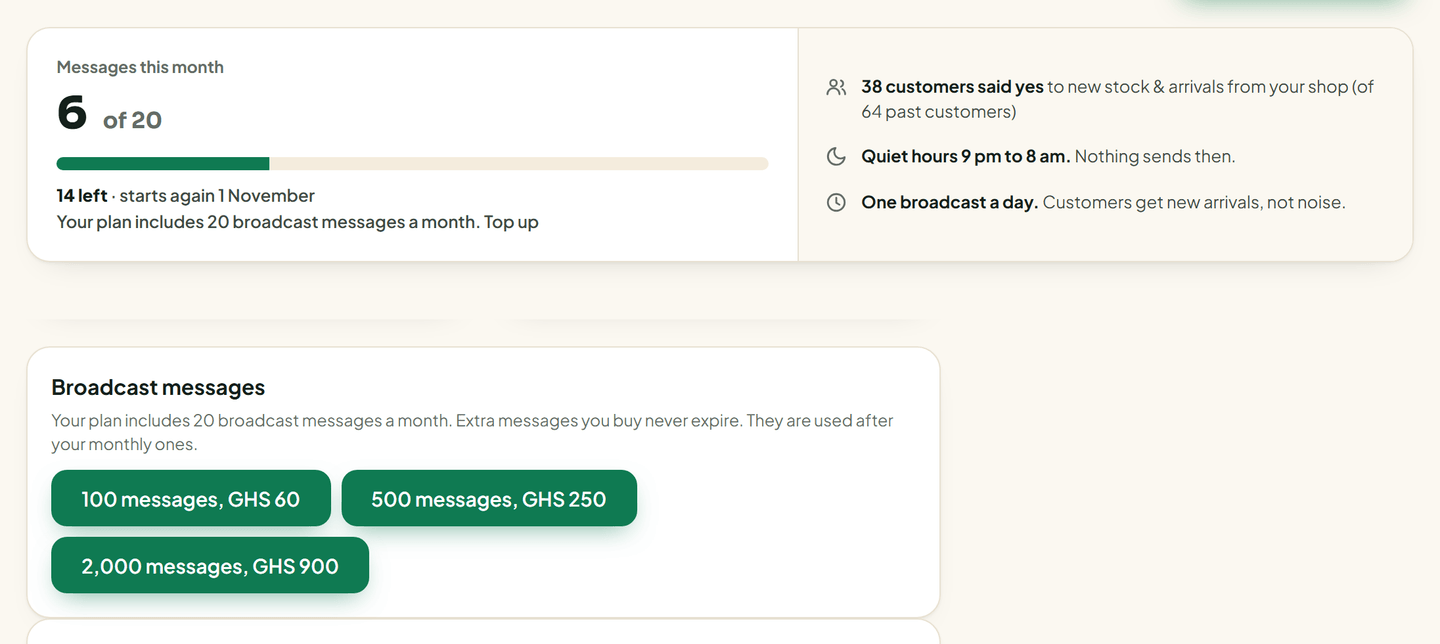
Buy more
- Open Billing on the web.
- Find Broadcast messages.
- Pick a bundle: 100 messages for GH₵60, 500 for GH₵250, or 2,000 for GH₵900.
- Pay by MoMo or card.
The messages are added as soon as the payment goes through.
How bundles are used
- Your monthly messages go first. Bundle messages are used after them.
- Bundle messages never expire.
Good to know
- Bundles are bought on the web only. The Vendwa app says "Manage on the web."
- Only the owner sees Billing.
- Test sends to your own WhatsApp also use 1 message each.
Was this helpful?
We read every answer. We do not ask for your name.