Where your orders come from, and what each ad returns
Web & iOS 1 min read
See which ads, posts and links brought chats, orders and money. Add what each ad cost and Vendwa shows what came back per cedi.
You paid GH₵150 to boost a post. Did it sell anything? This card tells you.
Read the card
Open Sales and scroll to Where your orders come from. Pick 7, 30 or 90 days.
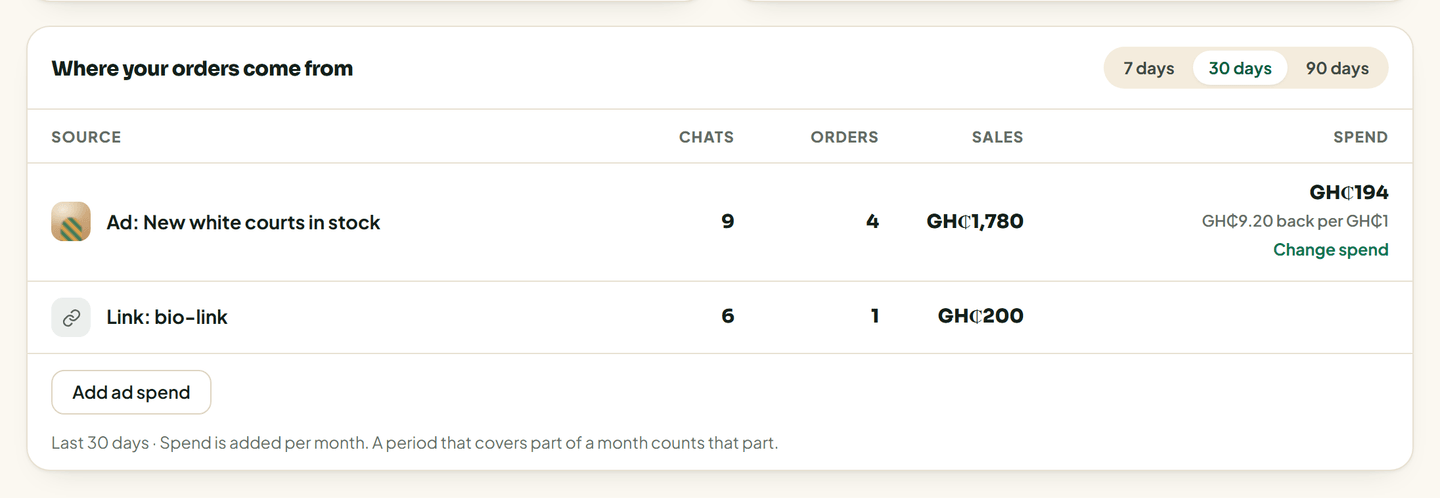
Each row is one source: an ad, a post, an Instagram comment, or a link. For each one you see:
- Chats it started;
- Orders from those chats;
- Sales, the money from those orders;
- Spend, if you added what it cost.
If nothing shows yet, no ad or post has sent you a chat in that period.
Add what an ad cost
- Tap Add ad spend, or Change spend on an ad row.
- Type the Ad name if it is new. "Fugu sale, October".
- Pick the month and type the spend in GH₵, like 150.
- Save.
The row now shows what came back for every cedi you spent, for example "GH₵4 back per GH₵1".
How spend is counted
You enter spend per month. If you look at 7 days of a 30-day month, the card counts 7/30 of that month's spend. A whole month inside the period counts in full.
Good to know
- Only owners and managers see this card and can add spend.
- The same rows go into your sales report.
- Vendwa can only trace chats that came in through an ad, a post or a link it knows about. A customer who saved your number years ago shows under their own channel, not an ad.
Was this helpful?
We read every answer. We do not ask for your name.