What broadcasts are, and who gets them
A broadcast tells your past buyers about new stock. It only goes to customers who said yes, and anyone can reply STOP.
New smocks came in on Monday. The customers who bought from you last month would want to know. A broadcast tells them, in one WhatsApp message from your shop's number.
Only customers who said yes
Vendwa never sends a broadcast to someone who did not agree to it. It asks for you:
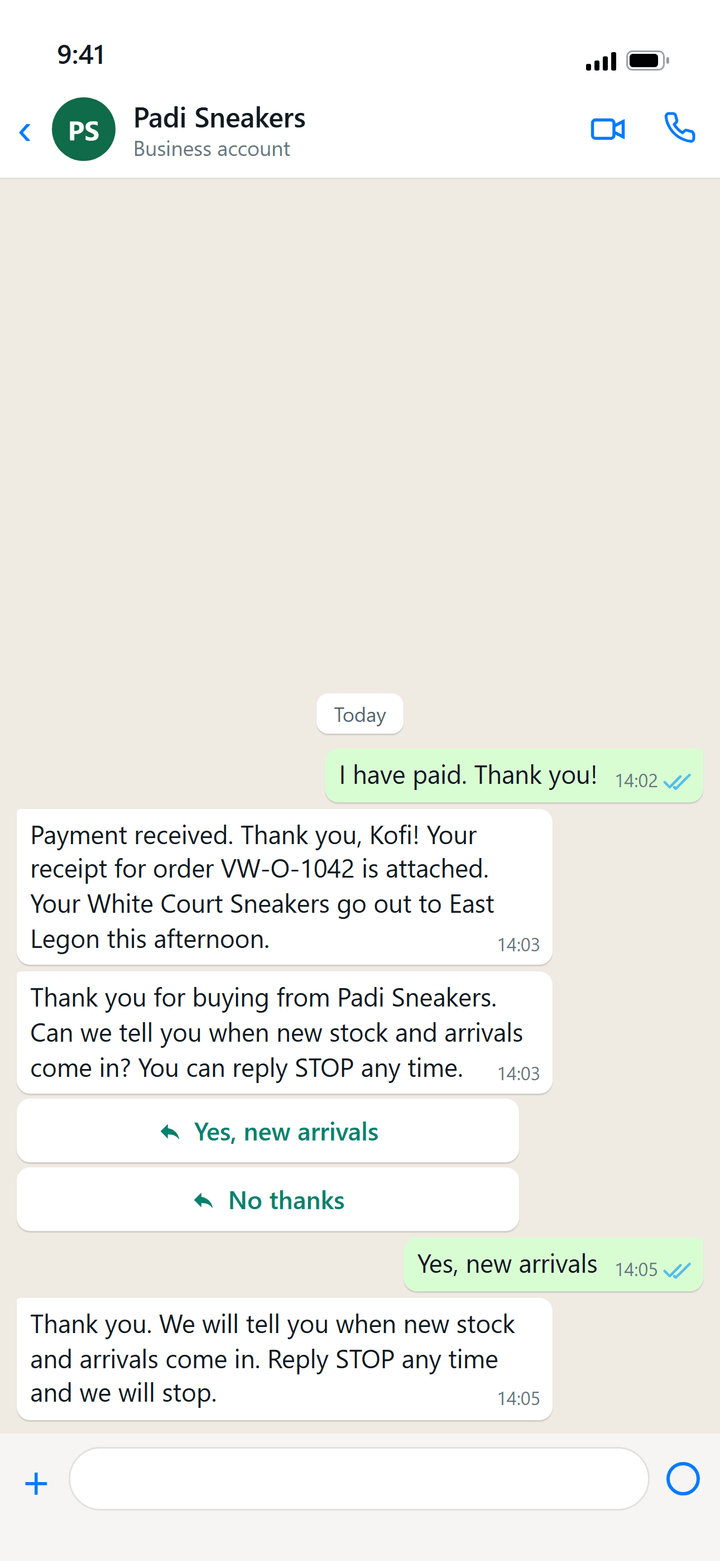
- A customer pays for an order and gets the receipt.
- A little later, Vendwa asks once: "Thank you for buying from Ama Boutique. Can we tell you when new stock and arrivals come in? You can reply STOP any time."
- The customer taps Yes, new arrivals or No thanks.
Only those who tap yes can get your broadcasts. Vendwa asks each customer one time, never again.
STOP and START
A customer who replies STOP at any time is taken off at once, and gets one short note saying so. Their chat with your shop carries on as normal. They can still order.
If they change their mind, they reply START.
What a broadcast looks like
Every broadcast opens with "Hello from" your shop name, then your words, then "Reply here to order or ask a question." WhatsApp approved that wrapper, so it stays the same. You write the middle.
You can add one product, or up to 10 as cards the customer swipes. See How to send a broadcast.
Replies
When a customer replies, it lands in Chats like any other message, and Vendwa answers it.
Good to know
- Broadcasts are on WhatsApp only.
- Only an owner or a manager can send one.
- Asking to be told when an item is back in stock is not a yes to broadcasts.
We read every answer. We do not ask for your name.