How an order gets recorded
Vendwa collects the details you asked for, locks the total, and pings you. The price cannot move after that.
What happens in the chat
- The customer agrees to a price.
- Vendwa collects the details you set in Settings — name and delivery address by default, plus phone, email or a delivery note if you asked for them.
- It works out the total, including the delivery fee for their zone.
- It records the order and says the total once.
- You get a ping on WhatsApp and a push on the app.
The total is locked
Once the order is recorded, the price is fixed. Vendwa will not agree to a different total afterwards — not for a discount, not for a correction, not even when the customer is right. It holds the recorded number and brings you in.
That is on purpose. The receipt is built from the recorded total, so what was said and what was charged can never differ.
Choose what gets collected
- Open Settings.
- Find Customer details at checkout.
- Tick what you need: name, delivery address, phone, email, delivery notes.
- Save.
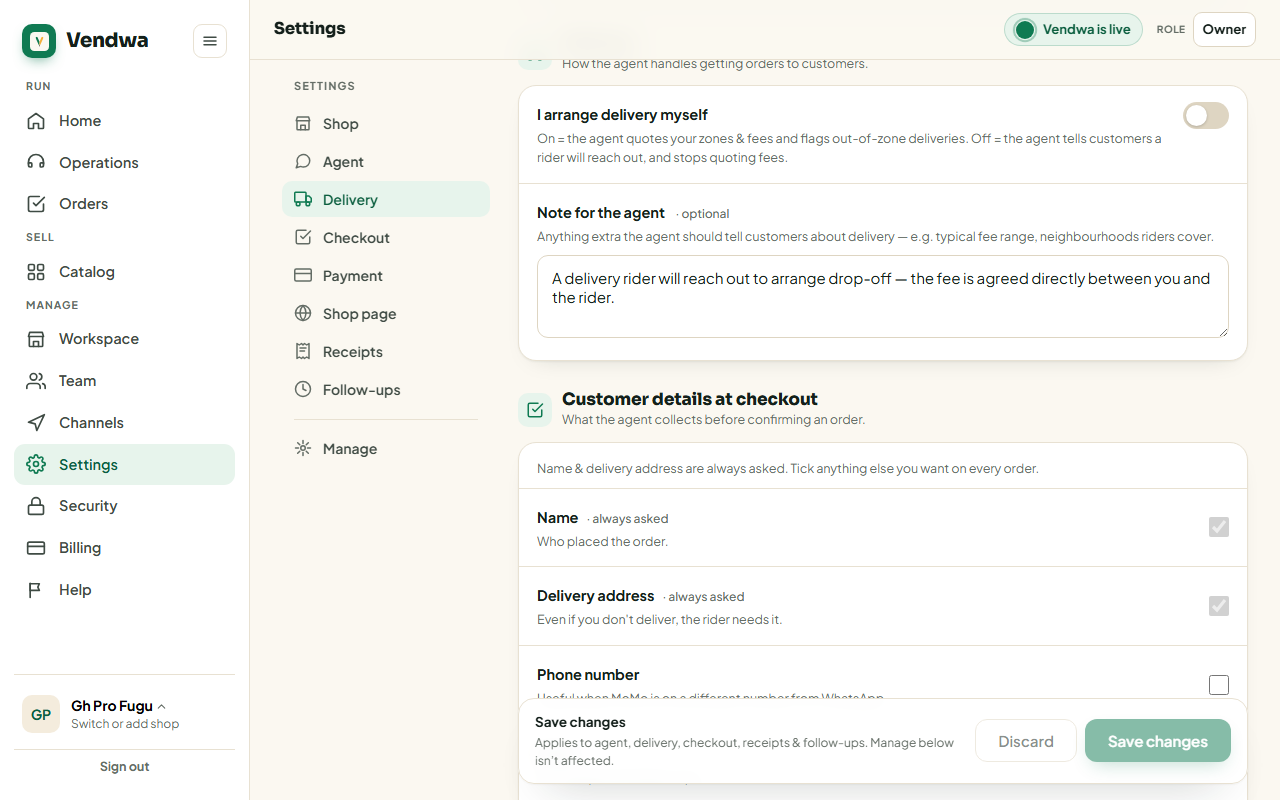
Name and delivery address are always asked.
Delivery fees
Set your zones in Settings as Area:Fee in cedis — one per line. Accra:20 means GH₵20 delivery to Accra. Vendwa quotes those fees and flags anything outside your zones.
Turn off I arrange delivery myself and Vendwa stops quoting fees. It tells customers a rider will reach out instead.
We read every answer. We do not ask for your name.